IT Service Management (ITSM) teams are increasingly turning to generative AI (GenAI) to streamline workflows, reduce resolution times, and improve user satisfaction. In this post, we’ll explore two architectures for integrating GenAI into platforms like ServiceNow: man-in-the-middle (human-in-the-loop) and agentic automation (autonomous AI agents).
Why GenAI for ITSM?
- Ticket overload: Teams handle hundreds of tickets daily, leading to burnout and delays.
- Knowledge gaps: Agents struggle to find relevant solutions quickly.
- Repetitive tasks: Manual triage and updates consume valuable time.
GenAI can automate classification, suggest solutions, and even resolve incidents-but how you integrate it matters. Let’s compare two approaches.
Architecture 1: Man-in-the-Middle (Human-in-the-Loop)
In this approach, GenAI acts as an assistant to human agents. It analyzes tickets, suggests actions, and automates tasks but requires human approval before execution.
Workflow Diagram:

Use Cases:
- High-risk scenarios (e.g., critical infrastructure changes).
- Compliance-heavy environments (e.g., healthcare, finance).
Implementation Steps:
1. Set Up ServiceNow Outbound REST Integration (javascript)
// ServiceNow Scripted REST API (Outbound)
var request = new sn_ws.RESTMessageV2();
request.setEndpoint('https://your-middleware.com/process-ticket');
request.setHttpMethod('POST');
request.setRequestBody(JSON.stringify(current));
var response = request.execute();
2. Build Middleware (Python/Flask Example)
from flask import Flask, request, jsonify
import openai

app = Flask(__name__)
openai.api_key = "your-api-key"

@app.route('/process-ticket', methods=['POST'])
def handle_ticket():
    ticket_data = request.json

    # GenAI analysis
    prompt = f"""
    Classify this ITSM ticket and suggest priority (Critical/High/Medium/Low):
    Title: {ticket_data['short_description']}
    Description: {ticket_data['description']}
    """

    response = openai.ChatCompletion.create(
        model="gpt-4",
        messages=[{"role": "user", "content": prompt}]
    )

    suggestion = response.choices[0].message['content']
    return jsonify({"suggestion": suggestion, "ticket_id": ticket_data['number']})
3. Human Review & Action
Agents review GenAI’s suggestions in a dashboard and approve/reject them.
Architecture 2: GenAI Agentic Automation
Here, GenAI agents act autonomously within guardrails. They analyze tickets, execute actions (e.g., resolving incidents, updating KBs), and only escalate exceptions to humans.
Workflow Diagram:

Use Cases:
- Low-risk, repetitive tasks (e.g., password resets, FAQ responses).
- High-volume environments needing 24/7 support.
Implementation Steps:
1. Autonomous Ticket Resolution with Python
import requests
import openai

def resolve_ticket_automatically(ticket_id):
    # Fetch ticket from ServiceNow
    snow_url = f"https://instance.service-now.com/api/now/table/incident/{ticket_id}"
    headers = {"Accept": "application/json"}
    auth = ("admin", "password")
    response = requests.get(snow_url, headers=headers, auth=auth)
    ticket = response.json()['result']

    # GenAI analysis
    prompt = f"""
    Resolve this ticket autonomously if possible. Provide a solution and mark as closed.
    Ticket: {ticket['description']}
    """

    ai_response = openai.ChatCompletion.create(
        model="gpt-4",
        messages=[{"role": "user", "content": prompt}]
    )

    # Auto-resolve if confidence is high
    if "reset password" in ai_response.choices[0].message['content'].lower():
        update_data = {
            "state": "6",  # Resolved
            "close_notes": "Automatically resolved: Password reset instructions sent."
        }
        requests.patch(snow_url, json=update_data, headers=headers, auth=auth)
2. Guardrails for Safety
- Limit permissions (e.g., agents can’t modify user roles).
- Log all actions for auditing.
- Escalate tickets containing keywords like “outage” or “data breach” to humans.
Key Considerations
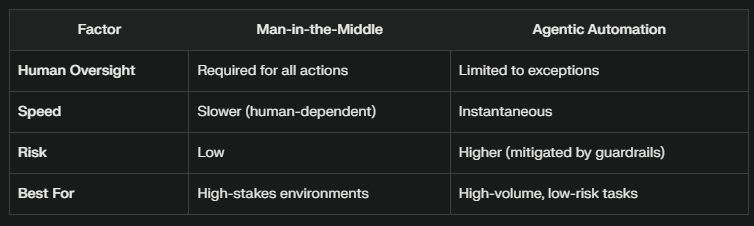
Combined Architecture Diagram:
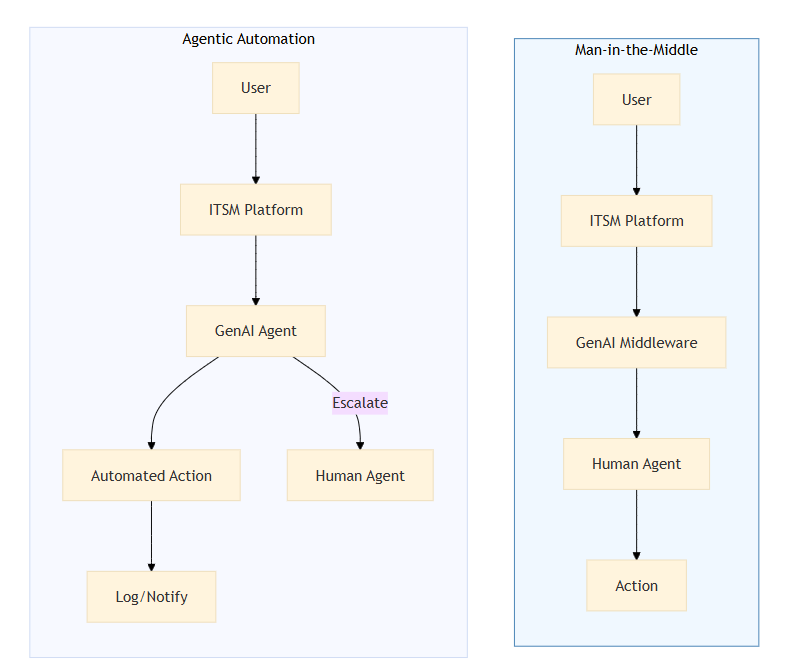
Best Practices for Both Architectures
- Data Privacy: Mask PII/PHI in tickets before sending to GenAI APIs.
- Feedback Loops: Let agents rate AI suggestions to improve models.
- Tooling: Use frameworks like LangChain for complex workflows.
Conclusion
Whether you choose man-in-the-middle or agentic automation depends on your risk tolerance and use case. Start with a hybrid approach: use autonomous agents for simple tasks (e.g., FAQs) and human-in-the-loop for critical workflows. As trust in the system grows, expand automation cautiously.
GenAI is set to redefine ITSM, propelling organizations from automation to true intelligence. The journey is just beginning-those who embrace this shift will not only optimize IT operations but also unlock new levels of agility, resilience, and innovation. The future of ITSM is not just faster or cheaper-it’s smarter, more adaptive, and profoundly more human.

 {{ vExpose }}.Blog