Part of my job is to demonstrate the Red Hat OpenShift integration with Dell Technologies’ portfolio. Most of the time I repurpose my OCP infrastructure and re-install the cluster. This means using the same Bastion host to manage the new OCP cluster. There have been a couple of instances where I forgot to include bastion host SSH keys in the OCP installation and because of that, I couldn’t log in to the OCP cluster nodes.
By default, RH CoreOS gets installed with a single user (core) with the option to add SSH keys at the install time. Most of the tasks in the RH OCP environment are done from the bastion/service node without the need to log in directly on the OCP nodes. But in some cases, you might find it useful to have SSH access to OCP nodes. In my case, it was for configuring the iSCSI and multipath on OCP nodes (for CSI configuration)
Installing SSH keys post OCP installation is a bit tricky and hence the purpose of this blog. I hope this helps fellow OCP architects (and as a reference for me as well).
To start with below is the high-level Red Hat OCP setup I have created. My test OCP cluster (version 4.8.x) is having 3 nodes, which are acting as both master and worker.
Logging into the RH OCP cluster from bastion/service node
Before you get started make sure you’re able to execute OC commands from the bastion/service node. If you’re getting an error (like below) then make sure you’re logged into the newly created cluster.
RH OCP – Login Error
For connecting the service node to the RH OCP cluster you will need an API token. For generating the API token, log into the RH OCP UI –> Click on User Name (top right corner) –> Click on Copy Login Command.
This will open a new window. Click on the Display Token link. Copy the oc login command and run it on the service node.
RH OCP – Copy Login Command RH OCP – Log into the OCP Cluster
Update RH OCP SSH Keys
In RH OCP there are 2 MachineConfigs (99-master-ssh and 99-worker-ssh) that handle the SSH key management. You can list those using the below command. If you had given the SSH keys while installing RH OCP then it will get registered in these MachineConfigs
The next step is to download the MachineConfig as YAML to update the SSH keys. You can run the below command to download the machine config object. In this case, I am getting the configuration from the master server.
[root@ocp-svc ~]# oc get mc 99-master-ssh -o yaml > 99-master-ssh.yaml
Copy the SSH keys from the service/bastion node. You can generate the new keys (if needed using the ssh-keygen command). By default, SSH keys are stored on the /root/.ssh/id_rsa.pub location.
Edit the downloaded 99-master-ssh.yaml file and append the copied SSH key in the passwd section of the yaml file (as shown below) and save the file. Make sure you follow the YAML syntax while editing the file.
Then run the following command to apply the new MachineConfig file with the updated SSH key. This step might restart your nodes (one by one).
[root@ocp-svc ~]# oc apply -f 99-master-ssh.yaml
At this stage, you will be able to log into the master nodes. You’ll need to run the same procedure again for the worker nodes by updating the 99-worker-ssh MachineConfig.
Additionally, if you’re reusing the bastion/service node then make sure you remove the old entries from the /root/.ssh/known_hosts file.
Recently while I was trying to install AWX using Ansible I came across below error on Centos.
Docker-compose error while installing AWX
fatal: [localhost]: FAILED! => {"changed": false, "msg": "Unable to load docker-compose. Try `pip install docker-compose`. Error: Traceback (most recent call last):\n File \"/tmp/ansible_docker_compose_payload_jNhEZ8/ansible_docker_compose_payload.zip/ansible/modules/cloud/docker/docker_compose.py\", line 483, in <module>\n File \"/usr/lib/python2.7/site-packages/compose/cli/command.py\", line 12, in <module>\n from .. import config\n File \"/usr/lib/python2.7/site-packages/compose/config/__init__.py\", line 6, in <module>\n from .config import ConfigurationError\n File \"/usr/lib/python2.7/site-packages/compose/config/config.py\", line 51, in <module>\n from .validation import match_named_volumes\n File \"/usr/lib/python2.7/site-packages/compose/config/validation.py\", line 12, in <module>\n from jsonschema import Draft4Validator\n File \"/usr/lib/python2.7/site-packages/jsonschema/__init__.py\", line 33, in <module>\n import importlib_metadata as metadata\n File \"/usr/lib/python2.7/site-packages/importlib_metadata/__init__.py\", line 9, in <module>\n import zipp\nImportError: No module named zipp\n"}
While this error was referring to missing pip package “docker-compose”, but when I tried to install the same it gave below error stating that it’s already installed.
[root@dw-test-1 installer]# pip install docker-compose
Requirement already satisfied (use --upgrade to upgrade): docker-compose in /usr/lib/python2.7/site-packages
Requirement already satisfied (use --upgrade to upgrade): texttable<2,>=0.9.0 in /usr/lib/python2.7/site-packages (from docker-compose)
Requirement already satisfied (use --upgrade to upgrade): requests<3,>=2.20.0 in /usr/lib/python2.7/site-packages (from docker-compose)
Requirement already satisfied (use --upgrade to upgrade): dockerpty<1,>=0.4.1 in /usr/lib/python2.7/site-packages (from docker-compose)
Requirement already satisfied (use --upgrade to upgrade): six<2,>=1.3.0 in /usr/lib/python2.7/site-packages (from docker-compose)
Requirement already satisfied (use --upgrade to upgrade): docopt<1,>=0.6.1 in /usr/lib/python2.7/site-packages (from docker-compose)
Requirement already satisfied (use --upgrade to upgrade): ipaddress<2,>=1.0.16; python_version < "3.3" in /usr/lib/python2.7/site-packages (from docker-compose)
Requirement already satisfied (use --upgrade to upgrade): subprocess32<4,>=3.5.4; python_version < "3.2" in /usr/lib64/python2.7/site-packages (from docker-compose)
Requirement already satisfied (use --upgrade to upgrade): enum34<2,>=1.0.4; python_version < "3.4" in /usr/lib/python2.7/site-packages (from docker-compose)
Requirement already satisfied (use --upgrade to upgrade): websocket-client<1,>=0.32.0 in /usr/lib/python2.7/site-packages (from docker-compose)
Requirement already satisfied (use --upgrade to upgrade): jsonschema<4,>=2.5.1 in /usr/lib/python2.7/site-packages (from docker-compose)
Requirement already satisfied (use --upgrade to upgrade): backports.shutil-get-terminal-size==1.0.0; python_version < "3.3" in /usr/lib/python2.7/site-packages (from docker-compose)
Requirement already satisfied (use --upgrade to upgrade): backports.ssl-match-hostname<4,>=3.5; python_version < "3.5" in /usr/lib/python2.7/site-packages (from docker-compose)
Requirement already satisfied (use --upgrade to upgrade): cached-property<2,>=1.2.0 in /usr/lib/python2.7/site-packages (from docker-compose)
Requirement already satisfied (use --upgrade to upgrade): PyYAML<6,>=3.10 in /usr/lib64/python2.7/site-packages (from docker-compose)
Requirement already satisfied (use --upgrade to upgrade): docker[ssh]<5,>=3.7.0 in /usr/lib/python2.7/site-packages (from docker-compose)
Requirement already satisfied (use --upgrade to upgrade): urllib3!=1.25.0,!=1.25.1,<1.26,>=1.21.1 in /usr/lib/python2.7/site-packages (from requests<3,>=2.20.0->docker-compose)
Requirement already satisfied (use --upgrade to upgrade): idna<3,>=2.5 in /usr/lib/python2.7/site-packages (from requests<3,>=2.20.0->docker-compose)
Requirement already satisfied (use --upgrade to upgrade): chardet<4,>=3.0.2 in /usr/lib/python2.7/site-packages (from requests<3,>=2.20.0->docker-compose)
Requirement already satisfied (use --upgrade to upgrade): certifi>=2017.4.17 in /usr/lib/python2.7/site-packages (from requests<3,>=2.20.0->docker-compose)
Requirement already satisfied (use --upgrade to upgrade): pyrsistent>=0.14.0 in /usr/lib64/python2.7/site-packages (from jsonschema<4,>=2.5.1->docker-compose)
Requirement already satisfied (use --upgrade to upgrade): setuptools in /usr/lib/python2.7/site-packages (from jsonschema<4,>=2.5.1->docker-compose)
Requirement already satisfied (use --upgrade to upgrade): attrs>=17.4.0 in /usr/lib/python2.7/site-packages (from jsonschema<4,>=2.5.1->docker-compose)
Requirement already satisfied (use --upgrade to upgrade): importlib-metadata; python_version < "3.8" in /usr/lib/python2.7/site-packages (from jsonschema<4,>=2.5.1->docker-compose)
Requirement already satisfied (use --upgrade to upgrade): functools32; python_version < "3" in /usr/lib/python2.7/site-packages (from jsonschema<4,>=2.5.1->docker-compose)
Requirement already satisfied (use --upgrade to upgrade): paramiko>=2.4.2; extra == "ssh" in /usr/lib/python2.7/site-packages (from docker[ssh]<5,>=3.7.0->docker-compose)
Collecting configparser>=3.5; python_version < "3" (from importlib-metadata; python_version < "3.8"->jsonschema<4,>=2.5.1->docker-compose)
  Using cached https://files.pythonhosted.org/packages/e5/7c/d4ccbcde76b4eea8cbd73b67b88c72578e8b4944d1270021596e80b13deb/configparser-5.0.0.tar.gz
  Running setup.py (path:/tmp/pip-build-c4RmaK/configparser/setup.py) egg_info for package configparser produced metadata for project name unknown. Fix your #egg=configparser fragments.
  Requirement already satisfied (use --upgrade to upgrade): unknown from https://files.pythonhosted.org/packages/e5/7c/d4ccbcde76b4eea8cbd73b67b88c72578e8b4944d1270021596e80b13deb/configparser-5.0.0.tar.gz#sha256=2ca44140ee259b5e3d8aaf47c79c36a7ab0d5e94d70bd4105c03ede7a20ea5a1 in /usr/lib/python2.7/site-packages (from importlib-metadata; python_version < "3.8"->jsonschema<4,>=2.5.1->docker-compose)
Collecting zipp>=0.5 (from importlib-metadata; python_version < "3.8"->jsonschema<4,>=2.5.1->docker-compose)
  Using cached https://files.pythonhosted.org/packages/ce/8c/2c5f7dc1b418f659d36c04dec9446612fc7b45c8095cc7369dd772513055/zipp-3.1.0.tar.gz
  Running setup.py (path:/tmp/pip-build-c4RmaK/zipp/setup.py) egg_info for package zipp produced metadata for project name unknown. Fix your #egg=zipp fragments.
  Requirement already satisfied (use --upgrade to upgrade): unknown from https://files.pythonhosted.org/packages/ce/8c/2c5f7dc1b418f659d36c04dec9446612fc7b45c8095cc7369dd772513055/zipp-3.1.0.tar.gz#sha256=c599e4d75c98f6798c509911d08a22e6c021d074469042177c8c86fb92eefd96 in /usr/lib/python2.7/site-packages (from importlib-metadata; python_version < "3.8"->jsonschema<4,>=2.5.1->docker-compose)
Requirement already satisfied (use --upgrade to upgrade): contextlib2; python_version < "3" in /usr/lib/python2.7/site-packages (from importlib-metadata; python_version < "3.8"->jsonschema<4,>=2.5.1->docker-compose)
Requirement already satisfied (use --upgrade to upgrade): pathlib2; python_version < "3" in /usr/lib/python2.7/site-packages (from importlib-metadata; python_version < "3.8"->jsonschema<4,>=2.5.1->docker-compose)
Requirement already satisfied (use --upgrade to upgrade): pynacl>=1.0.1 in /usr/lib64/python2.7/site-packages (from paramiko>=2.4.2; extra == "ssh"->docker[ssh]<5,>=3.7.0->docker-compose)
Requirement already satisfied (use --upgrade to upgrade): cryptography>=2.5 in /usr/lib64/python2.7/site-packages (from paramiko>=2.4.2; extra == "ssh"->docker[ssh]<5,>=3.7.0->docker-compose)
Requirement already satisfied (use --upgrade to upgrade): bcrypt>=3.1.3 in /usr/lib64/python2.7/site-packages (from paramiko>=2.4.2; extra == "ssh"->docker[ssh]<5,>=3.7.0->docker-compose)
Requirement already satisfied (use --upgrade to upgrade): scandir; python_version < "3.5" in /usr/lib64/python2.7/site-packages (from pathlib2; python_version < "3"->importlib-metadata; python_version < "3.8"->jsonschema<4,>=2.5.1->docker-compose)
Requirement already satisfied (use --upgrade to upgrade): cffi>=1.4.1 in /usr/lib64/python2.7/site-packages (from pynacl>=1.0.1->paramiko>=2.4.2; extra == "ssh"->docker[ssh]<5,>=3.7.0->docker-compose)
Requirement already satisfied (use --upgrade to upgrade): pycparser in /usr/lib/python2.7/site-packages (from cffi>=1.4.1->pynacl>=1.0.1->paramiko>=2.4.2; extra == "ssh"->docker[ssh]<5,>=3.7.0->docker-compose)
You are using pip version 8.1.2, however version 20.0.2 is available.
You should consider upgrading via the 'pip install --upgrade pip' command.
After trying multiple solutions on several forums and reinstalling everything from scratch finally I thought of upgrading pip.
Post upgrading pip to latest version I reinstalled docker-compose.
[root@dw-test-1 installer]# pip install docker-compose
DEPRECATION: Python 2.7 reached the end of its life on January 1st, 2020. Please upgrade your Python as Python 2.7 is no longer maintained. A future version of pip will drop support for Python 2.7. More details about Python 2 support in pip, can be found at https://pip.pypa.io/en/latest/development/release-process/#python-2-support
Requirement already satisfied: docker-compose in /usr/lib/python2.7/site-packages (1.25.5)
Requirement already satisfied: backports.shutil-get-terminal-size==1.0.0; python_version < "3.3" in /usr/lib/python2.7/site-packages (from docker-compose) (1.0.0)
Requirement already satisfied: six<2,>=1.3.0 in /usr/lib/python2.7/site-packages (from docker-compose) (1.9.0)
Requirement already satisfied: PyYAML<6,>=3.10 in /usr/lib64/python2.7/site-packages (from docker-compose) (3.10)
Requirement already satisfied: docker[ssh]<5,>=3.7.0 in /usr/lib/python2.7/site-packages (from docker-compose) (4.2.0)
Requirement already satisfied: dockerpty<1,>=0.4.1 in /usr/lib/python2.7/site-packages (from docker-compose) (0.4.1)
Requirement already satisfied: jsonschema<4,>=2.5.1 in /usr/lib/python2.7/site-packages (from docker-compose) (3.2.0)
Requirement already satisfied: requests<3,>=2.20.0 in /usr/lib/python2.7/site-packages (from docker-compose) (2.23.0)
Requirement already satisfied: enum34<2,>=1.0.4; python_version < "3.4" in /usr/lib/python2.7/site-packages (from docker-compose) (1.0.4)
Requirement already satisfied: websocket-client<1,>=0.32.0 in /usr/lib/python2.7/site-packages (from docker-compose) (0.57.0)
Requirement already satisfied: cached-property<2,>=1.2.0 in /usr/lib/python2.7/site-packages (from docker-compose) (1.5.1)
Requirement already satisfied: ipaddress<2,>=1.0.16; python_version < "3.3" in /usr/lib/python2.7/site-packages (from docker-compose) (1.0.16)
Requirement already satisfied: docopt<1,>=0.6.1 in /usr/lib/python2.7/site-packages (from docker-compose) (0.6.2)
Requirement already satisfied: subprocess32<4,>=3.5.4; python_version < "3.2" in /usr/lib64/python2.7/site-packages (from docker-compose) (3.5.4)
Requirement already satisfied: texttable<2,>=0.9.0 in /usr/lib/python2.7/site-packages (from docker-compose) (1.6.2)
Requirement already satisfied: backports.ssl-match-hostname<4,>=3.5; python_version < "3.5" in /usr/lib/python2.7/site-packages (from docker-compose) (3.5.0.1)
Requirement already satisfied: paramiko>=2.4.2; extra == "ssh" in /usr/lib/python2.7/site-packages (from docker[ssh]<5,>=3.7.0->docker-compose) (2.7.1)
Requirement already satisfied: setuptools in /usr/lib/python2.7/site-packages (from jsonschema<4,>=2.5.1->docker-compose) (0.9.8)
Requirement already satisfied: pyrsistent>=0.14.0 in /usr/lib64/python2.7/site-packages (from jsonschema<4,>=2.5.1->docker-compose) (0.16.0)
Requirement already satisfied: attrs>=17.4.0 in /usr/lib/python2.7/site-packages (from jsonschema<4,>=2.5.1->docker-compose) (19.3.0)
Requirement already satisfied: importlib-metadata; python_version < "3.8" in /usr/lib/python2.7/site-packages (from jsonschema<4,>=2.5.1->docker-compose) (1.6.0)
Requirement already satisfied: functools32; python_version < "3" in /usr/lib/python2.7/site-packages (from jsonschema<4,>=2.5.1->docker-compose) (3.2.3.post2)
Requirement already satisfied: idna<3,>=2.5 in /usr/lib/python2.7/site-packages (from requests<3,>=2.20.0->docker-compose) (2.9)
Requirement already satisfied: chardet<4,>=3.0.2 in /usr/lib/python2.7/site-packages (from requests<3,>=2.20.0->docker-compose) (3.0.4)
Requirement already satisfied: urllib3!=1.25.0,!=1.25.1,<1.26,>=1.21.1 in /usr/lib/python2.7/site-packages (from requests<3,>=2.20.0->docker-compose) (1.25.8)
Requirement already satisfied: certifi>=2017.4.17 in /usr/lib/python2.7/site-packages (from requests<3,>=2.20.0->docker-compose) (2020.4.5.1)
Requirement already satisfied: bcrypt>=3.1.3 in /usr/lib64/python2.7/site-packages (from paramiko>=2.4.2; extra == "ssh"->docker[ssh]<5,>=3.7.0->docker-compose) (3.1.7)
Requirement already satisfied: pynacl>=1.0.1 in /usr/lib64/python2.7/site-packages (from paramiko>=2.4.2; extra == "ssh"->docker[ssh]<5,>=3.7.0->docker-compose) (1.3.0)
Requirement already satisfied: cryptography>=2.5 in /usr/lib64/python2.7/site-packages (from paramiko>=2.4.2; extra == "ssh"->docker[ssh]<5,>=3.7.0->docker-compose) (2.9)
Requirement already satisfied: pathlib2; python_version < "3" in /usr/lib/python2.7/site-packages (from importlib-metadata; python_version < "3.8"->jsonschema<4,>=2.5.1->docker-compose) (2.3.5)
Requirement already satisfied: contextlib2; python_version < "3" in /usr/lib/python2.7/site-packages (from importlib-metadata; python_version < "3.8"->jsonschema<4,>=2.5.1->docker-compose) (0.6.0.post1)
Collecting zipp>=0.5
  Downloading zipp-1.2.0-py2.py3-none-any.whl (4.8 kB)
Collecting configparser>=3.5; python_version < "3"
  Downloading configparser-4.0.2-py2.py3-none-any.whl (22 kB)
Requirement already satisfied: cffi>=1.1 in /usr/lib64/python2.7/site-packages (from bcrypt>=3.1.3->paramiko>=2.4.2; extra == "ssh"->docker[ssh]<5,>=3.7.0->docker-compose) (1.14.0)
Requirement already satisfied: scandir; python_version < "3.5" in /usr/lib64/python2.7/site-packages (from pathlib2; python_version < "3"->importlib-metadata; python_version < "3.8"->jsonschema<4,>=2.5.1->docker-compose) (1.10.0)
Requirement already satisfied: pycparser in /usr/lib/python2.7/site-packages (from cffi>=1.1->bcrypt>=3.1.3->paramiko>=2.4.2; extra == "ssh"->docker[ssh]<5,>=3.7.0->docker-compose) (2.14)
Installing collected packages: zipp, configparser
Successfully installed configparser-4.0.2 zipp-1.2.0
This time zipp and configparser packages also got installed with docker-compose. This resolved my issue and I was able to go ahead with successful AWX installation.
In summary –
First upgrade pip to latest version
Then install docker-compose. Make sure zipp and configparser are getting installed with the same.
I recently came across a strange issue while installing Docker on CentOS (version 8) machine.
Issue –
When I tried below options to install docker on my machine I got the same error every time.
Installation Commands Used
yum install -y -q docker-ce
or
yum install -y docker-ce.x86_64
or
yum install docker-ce
Error message received
Error:
 Problem: package docker-ce-3:19.03.8-3.el7.x86_64 requires containerd.io >= 1.2.2-3, but none of the providers can be installed
  - cannot install the best candidate for the job
  - package containerd.io-1.2.10-3.2.el7.x86_64 is excluded
  - package containerd.io-1.2.13-3.1.el7.x86_64 is excluded
  - package containerd.io-1.2.2-3.3.el7.x86_64 is excluded
  - package containerd.io-1.2.2-3.el7.x86_64 is excluded
  - package containerd.io-1.2.4-3.1.el7.x86_64 is excluded
  - package containerd.io-1.2.5-3.1.el7.x86_64 is excluded
  - package containerd.io-1.2.6-3.3.el7.x86_64 is excluded
Resolution –
To resolve this issue, first we need to manually install the containerd.io package.
I have seen this error multiple times during my Ansible playbooks execution but always ignored it because I always got the expected result.
Eventually, I wanted to get rid of any errors/warnings from my final version of the playbook and wanted to take care of this error as well. Hence I had to do little readings in this error/warning.
[WARNING]: The value 1 (type int) in a string field was converted to u'1' (type string). If this does not look like what you expect, quote the entire value to ensure it does
not change.
As per the Ansible official documentation this is the Default behavior of starting Ansible version 2.8. Ansible will warn if a module expects a string, but a non-string value is passed and automatically converted to a string.
For example – If your playbook inputs a value version number 1.10 (parsed as float value) would be converted to '1.1'. Such conversions can result in unexpected behavior depending on context and also will/might change playbook’s expected outcomes
This behavior can be changed to be an error or to be ignored by setting the ANSIBLE_STRING_CONVERSION_ACTION environment variable, or by setting the string_conversion_action configuration in the defaults section of ansible.cfg.
You can refer to this link to change the string_conversion_action parameter in defaults section of Ansible.cfg. This will make sure Ansible will not change the input to String
2. Quote the input values in playbook
I personally prefer this method instead of editing Ansible.cfg file. To make sure you’re not getting string field conversion Warning message you can simply quote the input value. Below is the example for the same.
I created below tasks in my Ansible role playbook.
# Set net.bridge.bridge-nf-call-ip6tables value to 1 all K8S cluster nodes
  - name: ensure net.bridge.bridge-nf-call-ip6tables is set to 1
    sysctl:
     name: net.bridge.bridge-nf-call-ip6tables
     value: 1
     state: present

# Set net.bridge.bridge-nf-call-iptables value to 1 all K8S cluster nodes
  - name: ensure net.bridge.bridge-nf-call-iptables is set to 1
    sysctl:
     name: net.bridge.bridge-nf-call-iptables
     value: 1
     state: present
But when I executed this playbook I got below error
fatal: [prod-k8s-master01]: FAILED! => {"changed": false, "msg": "Failed to reload sysctl: sysctl: cannot stat /proc/sys/net/bridge/bridge-nf-call-ip6tables: No such file or dire                                                ctory\nsysctl: cannot stat /proc/sys/net/bridge/bridge-nf-call-iptables: No such file or directory\n"}
fatal: [prod-k8s-worker01]: FAILED! => {"changed": false, "msg": "Failed to reload sysctl: sysctl: cannot stat /proc/sys/net/bridge/bridge-nf-call-ip6tables: No such file or dire                                                ctory\nsysctl: cannot stat /proc/sys/net/bridge/bridge-nf-call-iptables: No such file or directory\n"}
After lots of reading and researching I found that I did not escalate the privileges on in my main YML file. After adding Become: yes in the main YML resolved my issue. Below is the syntax of my main playbook.
- hosts: all
  gather_facts: false
  become: yes
  vars_files:
    - answerfile.yml
Sometimes common mistakes are the most time consuming because we take it for granted.
Recently when I was creating Python automation script I faced this weird error. This literally wasted my couple of days and needless to mentioned frustration it caused.
Below is the error message which I was getting
*
fatal: [127.0.0.1]: FAILED! => {"changed": true
 "cmd": "python CreateFileSystem.py i-06a848f20bafd0475 10G"
 "delta": "0:00:00.077332"
 "end": "2019-11-21 06:58:53.018383"
 "msg": "non-zero return code"
 "rc": 1
 "start": "2019-11-21 06:58:52.941051"
 "stderr": "CreateFileSystem.py:49: SyntaxWarning: name 'unity_headers' is used prior to global declaration\n  global unity_headers\nTraceback (most recent call last):\n  File \"CreateFileSystem.py\"
 line 5
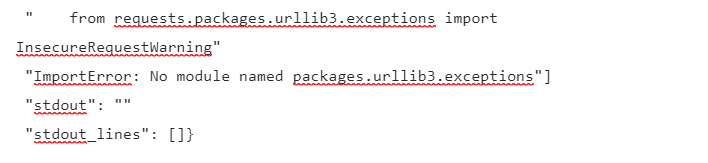
 in <module>\n    from requests.packages.urllib3.exceptions import InsecureRequestWarning\nImportError: No module named packages.urllib3.exceptions"
 "stderr_lines": ["CreateFileSystem.py:49: SyntaxWarning: name 'unity_headers' is used prior to global declaration"
 "  global unity_headers"
 "Traceback (most recent call last):"
 "  File \"CreateFileSystem.py\"
 line 5
 in <module>"
 "    from requests.packages.urllib3.exceptions import InsecureRequestWarning"
 "ImportError: No module named packages.urllib3.exceptions"]
 "stdout": ""
 "stdout_lines": []}
As you can see from the error it keeps saying that there’s error importing “urllib3” package. But This was already installed in the system
For resolving this I had to follow below steps.
Uninstall below packages
python-devel
libevent-devel
openssl-devel
libffi-devel
Requests (pip)
urllib3 (pip)
Install below packages
python-devel
libevent-devel
openssl-devel
libffi-devel
Run below command
pip install requests urllib3
These steps resolved the issue I was facing.
Also, DO NOT install pip packges (requests and urllib3) individually, run them as single command. This makes sure that required pip dependencies are also auto installed. Strangely I haven’t seen dependencies getting installed when you install them one by one.


![[WARNING]: The value 1 (type int) in a string field was converted to u’1′ (type string)](https://vexpose.blog/wp-content/uploads/2020/03/string-field-error.jpg)