Tag: python

  • Ansible with DellEMC Storage: Part 2 – Understanding Ansible

    Ansible with DellEMC Storage: Part 2 – Understanding Ansible

    This blog is the continuation of Ansible with DellEMC storage series. Earlier we discussed about getting started with installation of dependencies for Ansible and DellEMC Ansible module, followed by Ansible installation.

    In this blog let’s talk more around Ansible architecture and it’s concepts. So let’ get started.

    Similar to any other platform or software Ansible also has it’s own concepts which you should understand. This will help you get better hands-on with Ansible.

    Below diagram is the high level depiction of the Ansible concepts.

    Ansible Concepts

    On high level there are two types of nodes

    Managed Nodes (Right side of the diagram) – Managed nodes are the devices or software you’ll manage using Ansible. Note that managed nodes don’t need Ansible installed.

    Control/Master Node (Left side of the diagram) – This the machine Ansible is installed. On which you’ll login to run Ansible commands.

    Master node as multiple components which work together. Below are the high level details

    1. Inventory – This is the list of managed nodes which Ansible will talk to. Ansible always refers to node details from inventory file for executing any tasks. Inventory file support grouping, nesting, etc. which makes it easier for management and administration
    2. Modules – Each module defines certain Ansible function. You can execute modules using defining multiple tasks as part of playbooks
    3. Ansible Config – Consider this file as database of Ansible environment variables. Variables set in Ansible config supersedes any other setting configured in Ansible. Usually default configurations in this file are enough for many environments but there will be situations where you need to edit this file (/etc/ansible/ansible.cfg).
    4. Playbooks – Consider playbooks as list of many tasks which Ansible will execute in the sequence. Playbooks are written in YAML (.yml) and hence they are very easy to create and manage without the extensive knowledge of the coding.

    To simplify the playbook understanding just remember that

    • Playbooks contains Plays
      • Plays contains Tasks
        • Tasks call Modules

    Below is the example of Ansible Playbook

    sample Ansible playbook

    There are more concepts when it comes to Ansible (like Tower, Vault, Variables, etc.) but in my personal experience this is the good starting point.

    If you find this information stimulating enough and you want to read further then I would highly recommend that you start from here.

    I hope these bite sized blogs are helping you pickup Ansible faster. More to come šŸ™‚

  • Ansible with DellEMC Storage: Part 1 – Installing Ansible

    Ansible with DellEMC Storage: Part 1 – Installing Ansible

    There are many blogs which cover what is Ansible and why we should care. But this multi-part blog series will cover how DellEMC and Ansible can help you automate many storage tasks.

    Ansible is being used in many organizations nowadays to manage a vast range of infrastructure, ranging from traditional configuration management to cloud resources in public clouds to physical infrastructure such as network and storage devices. There are multiple reasons why you might want to use Ansible, including – but not limited to – below examples.

    • You’re trying to have efficient DevOps environment
    • Automate Day 1/2 tasks
    • Need centralized configuration management

    Getting Started with Ansible

    Even if you’ve not installed Ansible before, it’s very easy to get started. There are many different ways to install Ansible and many dependencies will be needed based on your environment and systems you’ll be managing.

    Once your Linux machine is up and running (CentOS in my case) you can follow next steps

    Apart from Ansible itself there will be many dependencies which needs to be installed. In the case of DellEMC PowerMax storage we will need

    Note that Ansible relies on Python and the Ansible for PowerMax modules relies on a the PyU4V Python library

    So let’s get started

    Check the installed Python version by running below command and make sure it’s supported version

    # python -V

    For installing PIP package on CentOS you will need to install EPEL repository, which can be done by running below command

    # sudo yum install epel-release -y

    Once EPEL is installed you can run below command to install PIP. Also check version once installed

    # sudo yum install python-pip -y
    # pip -V

    As mentioned earlier DellEMC PowerMax Ansible integration relies on a the PyU4V Python library Run below command to install PyU4V

    # pip install PyU4V

    Finally run below command to install Ansible

    # sudo yum install ansible

    At this point you have successfully installed Ansible and ready for next parts.

  • Fix Error – ImportError: No module named packages.urllib3.exceptions

    Fix Error – ImportError: No module named packages.urllib3.exceptions

    Recently when I was creating Python automation script I faced this weird error. This literally wasted my couple of days and needless to mentioned frustration it caused.

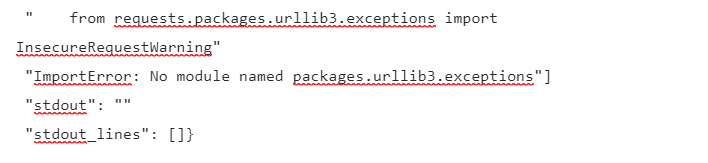
    Below is the error message which I was getting

    *
    fatal: [127.0.0.1]: FAILED! => {"changed": true
     "cmd": "python CreateFileSystem.py i-06a848f20bafd0475 10G"
     "delta": "0:00:00.077332"
     "end": "2019-11-21 06:58:53.018383"
     "msg": "non-zero return code"
     "rc": 1
     "start": "2019-11-21 06:58:52.941051"
     "stderr": "CreateFileSystem.py:49: SyntaxWarning: name 'unity_headers' is used prior to global declaration\n  global unity_headers\nTraceback (most recent call last):\n  File \"CreateFileSystem.py\"
     line 5
     in <module>\n    from requests.packages.urllib3.exceptions import InsecureRequestWarning\nImportError: No module named packages.urllib3.exceptions"
     "stderr_lines": ["CreateFileSystem.py:49: SyntaxWarning: name 'unity_headers' is used prior to global declaration"
     "  global unity_headers"
     "Traceback (most recent call last):"
     "  File \"CreateFileSystem.py\"
     line 5
     in <module>"
     "    from requests.packages.urllib3.exceptions import InsecureRequestWarning"
     "ImportError: No module named packages.urllib3.exceptions"]
     "stdout": ""
     "stdout_lines": []}

    As you can see from the error it keeps saying that there’s error importing “urllib3” package. But This was already installed in the system

    For resolving this I had to follow below steps.

    • Uninstall below packages
      • python-devel
      • libevent-devel
      • openssl-devel
      • libffi-devel
      • Requests (pip)
      • urllib3 (pip)
    • Install below packages
      • python-devel
      • libevent-devel
      • openssl-devel
      • libffi-devel
    • Run below command
    pip install requests urllib3

    These steps resolved the issue I was facing.

    Also, DO NOT install pip packges (requests and urllib3) individually, run them as single command. This makes sure that required pip dependencies are also auto installed. Strangely I haven’t seen dependencies getting installed when you install them one by one.